
Contextual Internal Linksfor WordPress,Automated
Install the plugin and connect your WordPress site. AI scans every post, page, and custom post type, then surfaces the contextual internal links you're missing. You approve, the plugin publishes, done.
Organic traffic
+127%
Internal links built
Why this plugin?
Your WordPress archive is full of posts that should link to each other.
Every new post pushes older ones further down your blog pages and category archives. Unless someone goes back and adds links by hand, those posts lose visibility, and search engines stop seeing how your content fits together.
The LinkerFlow plugin reads your posts, pages and custom post types, finds where one piece of content should reference another, and suggests the link inside the right sentence. It runs next to Yoast, Rank Math and your theme without touching their settings.
Links placed where readers need them
Suggestions only join posts that cover related topics, with anchors taken from your own sentences. No keyword lists, no links dropped at random.
Older posts start ranking again
Fresh links send authority back to content buried in the archive and shorten the click path from your homepage to it.
Approve first, then publish
Nothing changes in your posts until you accept a suggestion, and any inserted link can be removed later.
How it works
Three steps from plugin install to linked posts
No PHP, no CSV exports, no manual audit of every post. Install, review, publish.
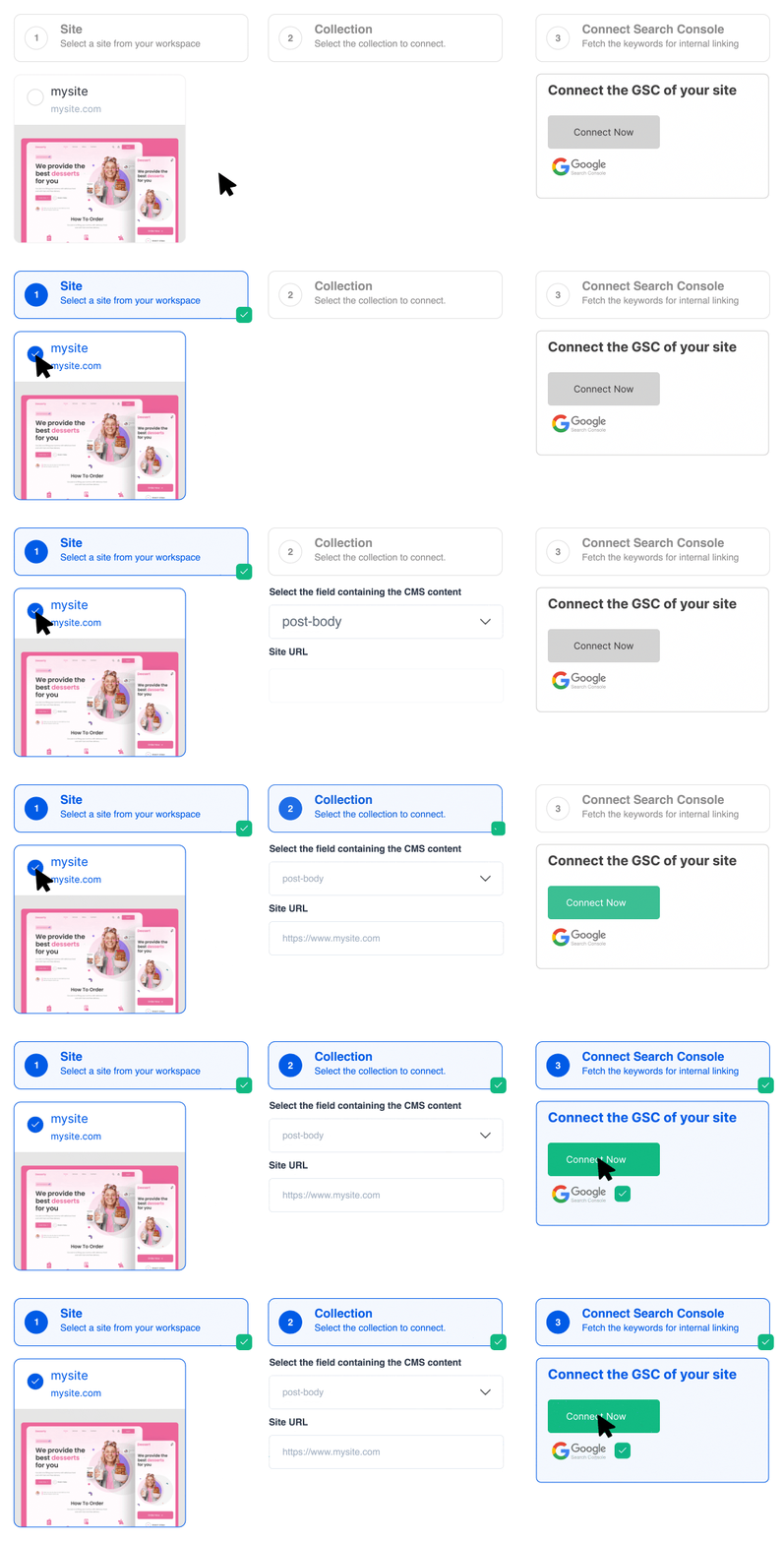
Install the plugin and connect
Add the LinkerFlow plugin from your WordPress dashboard and connect in one click. It crawls every published post, page, and custom post type automatically, no theme changes, no code.
Your content is analyzed post by post
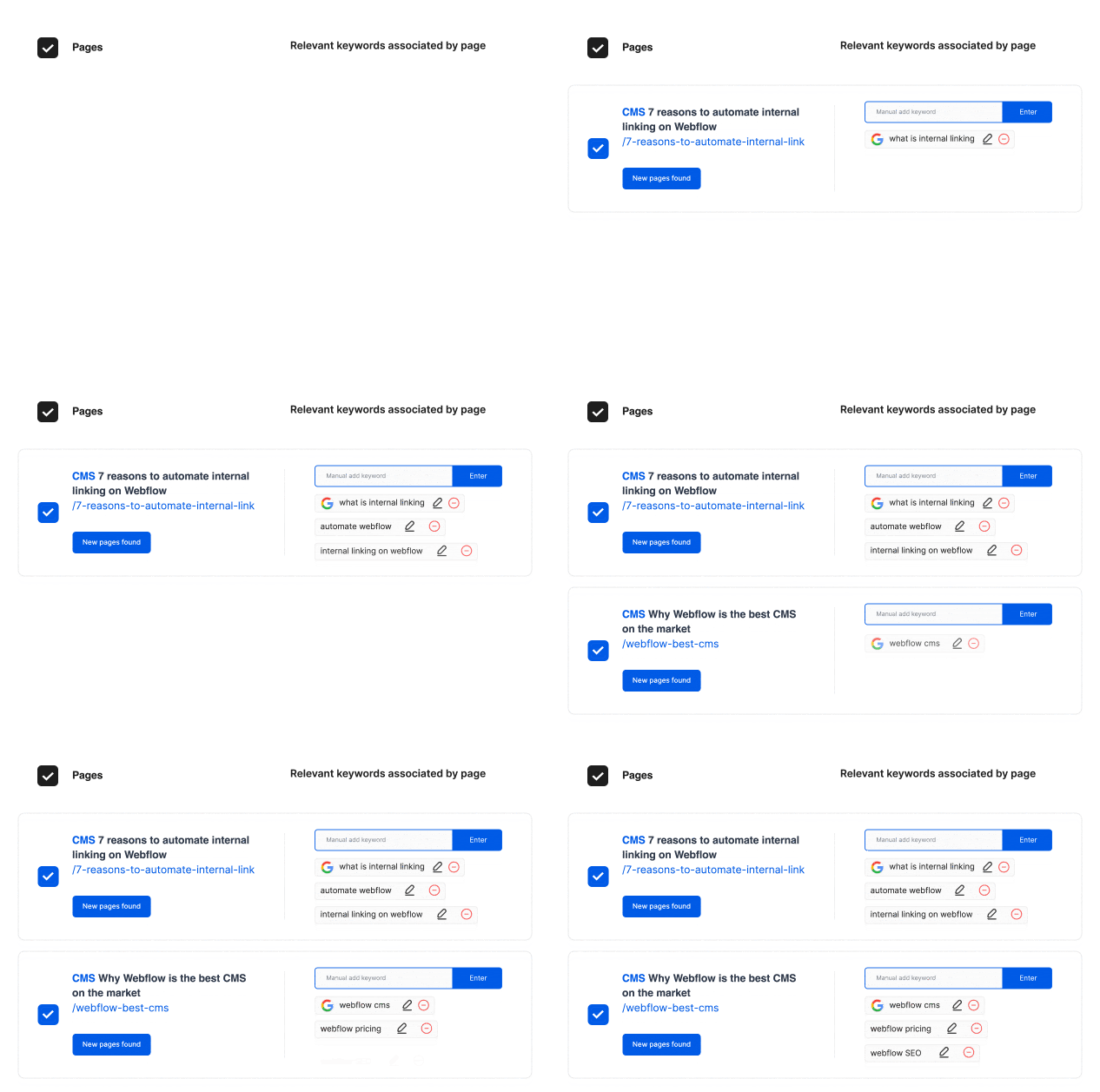
LinkerFlow reads each post and page, groups them by topic, and finds the sentences where a link to another post makes sense, with anchor text taken from your own words.
Approve and publish in one click
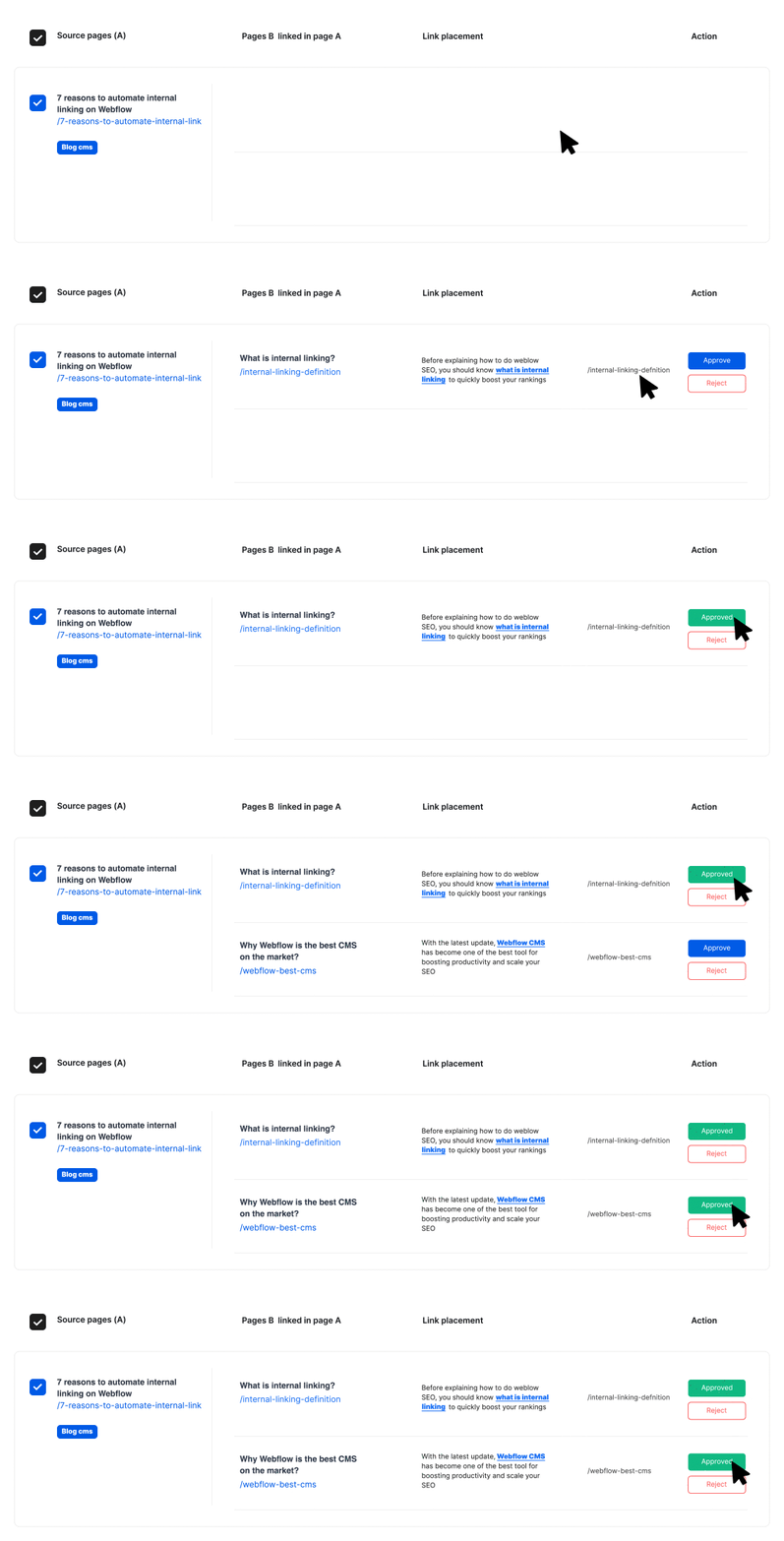
Each suggestion shows the source post, the target, the anchor and the sentence around it. Approve it and the plugin writes the link into your post content. No SEO background required.
Features
Plugin features built for WordPress
Need something else on your WordPress site? Send us a message.
Quick setup
Install it from the Plugins screen, connect in a couple of minutes, and receive your first suggestions after the initial crawl.
Posts, Pages and Custom Types
Every published post type is covered, including pages and WooCommerce products, so links can flow between your blog and your sales pages.
Anchors backed by Search Console
Search Console queries and the text of each post are combined to choose anchors that match how people really search.
More authority for your best posts
Contextual links pass link equity toward your cornerstone content and build topical authority inside each category.
Weekly re-crawl
Every 7 days LinkerFlow crawls your site again, picks up new posts, finds fresh link opportunities and runs a broken link check.
Broken links found and fixed
404 errors and broken internal or external links are listed with the post that contains them, and you can fix them from the LinkerFlow dashboard instead of opening each post.
For who
Who uses LinkerFlow on WordPress
From a single blog to a portfolio of client sites, LinkerFlow keeps every post connected.
Bloggers & Publishers
You publish constantly. LinkerFlow links each new article to the right older posts, so your archive keeps working for you.
Freelancers & Developers
Hand over WordPress projects with internal linking already done, without adding hours to the quote.
SEO Professionals
See which posts lack incoming links and which should point where across the whole site, next to the Yoast or Rank Math data you already use.
Agencies on WordPress
Offer internal linking to every WordPress client without adding staff. Install one plugin per site, or let our WordPress SEO service run it for you.
Pricing
GET 4 MONTHS FREE!
Single



For single language WordPress sites
- 1 website
- Up to 5 Collaborators
- GSC & AI anchor keywords
- Primary Locale Only
- Unlimited Links
- Weekly Suggestions & Reports
- All Languages Supported
Multilingual
For multilingual WordPress sites
- 1 website
- Up to 5 Collaborators
- GSC & AI anchor keywords
- Unlimited Links
- Weekly Suggestions & Reports
- All Languages Supported
Agency / Enterprise
For agencies managing multiple WordPress sites
- From 3+ websites to unlimited
- Priority support
- More collaborator seats
FAQ
Frequently asked questions
Everything you need to know about internal linking on WordPress.
Only with your approval. LinkerFlow analyzes your published content and surfaces every link suggestion in your dashboard first. The plugin inserts only the links you greenlight, and you can roll any of them back at any time. Nothing is published behind your back.
Yes. LinkerFlow crawls all published content types on your WordPress site, including standard posts, pages, and custom post types from plugins like WooCommerce. Contextual linking across large content libraries is exactly where it adds the most value.
No. LinkerFlow handles contextual internal linking, something Yoast and Rank Math don't automate. It runs alongside your existing SEO plugin without overriding settings, sitemaps, or meta tags. They complement each other.
Yes. LinkerFlow works with the native Block editor (Gutenberg) and with popular page builders like Divi (compatible up to version 4) and Elementor. Contact us if you run into any bug with these, or if you use a different one.
Yes. A link is only suggested when two posts share a real semantic relationship, and the anchor text comes from words already in your sentence. If a suggestion feels forced, simply reject it.
The price depends on how many pages your site has, billed monthly or yearly. Every plan includes unlimited suggestions, a weekly crawl and review controls. If you cancel, the links already published stay in your posts.
Get started
Give your WordPress posts the links they are missing
Install the plugin, review the suggestions and publish the ones you like. Nothing goes live without your approval.